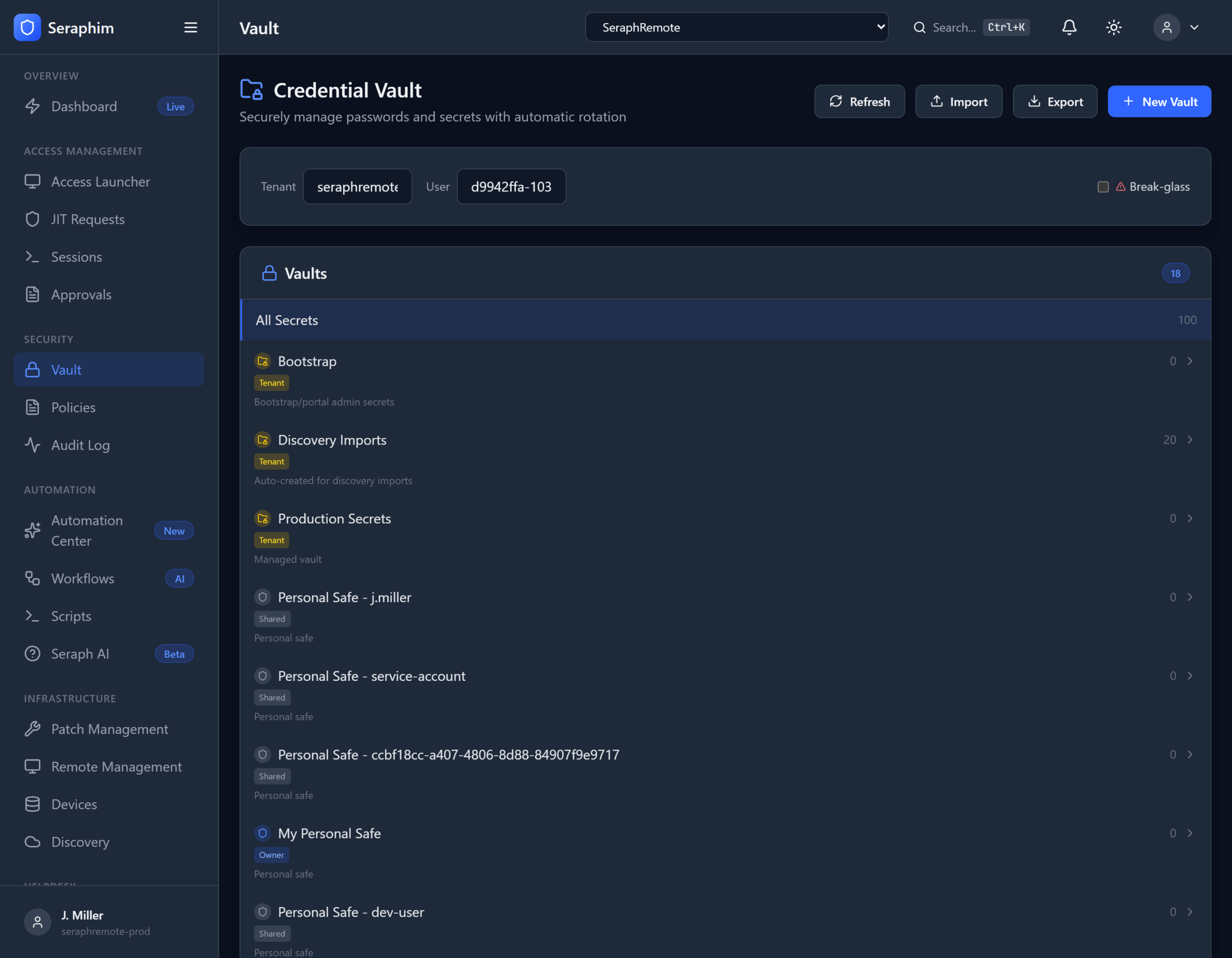
Credential Vault in UNISIGN gives IT support teams (especially MSPs) proper enterprise-grade Privileged Access Management (PAM) — something most Remote Monitoring and Management (RMM) tools completely lack.
Here’s what each piece actually means in day-to-day operations:
Vaulted Credentials with Checkout
Credentials (admin passwords, service accounts, SSH keys, API tokens, etc.) are stored in a secure, encrypted vault instead of living in technicians’ heads, spreadsheets, password managers, or RMM notes.
- A technician working on a ticket doesn’t need to know or see the actual password.
- They check out the credential for a specific task or time window.
- The system injects the credential directly into the session or script (e.g., RDP, SSH, PowerShell, or remote tool).
- Once the task is done or the time expires, access is automatically revoked.
In practice: A tech gets a ticket to fix a server issue. They open the ticket in the helpdesk, request the credential for that device, get temporary access injected into their remote session, do the work, and the credential is checked back in — no password ever exposed.
Rotation
Passwords and secrets are automatically rotated on a schedule or after every use/checkout.
This eliminates “standing privileges” and the common habit of reusing the same admin password for months or years.
In practice: After a technician checks in a credential (or on a nightly/weekly policy), UNISIGN changes the password on the target system and updates the vault. The old password becomes useless.
Break-Glass
Emergency override access for true crises (major outage, ransomware recovery, critical system down, key person unavailable).
Authorized users can bypass normal approval workflows to get immediate access, but every break-glass event is heavily logged, alerted, and auditable.
In practice: At 2 a.m. during a full site outage, a senior tech can trigger break-glass to regain access to a domain controller or firewall without waiting for an approver who is asleep — but the system creates a full forensic record of exactly what happened and why.
Per-Tenant Isolation (Critical for MSPs)
Each client’s credentials, policies, sessions, and audit logs are completely isolated from every other client.
Even if the same technician supports multiple customers, they cannot accidentally (or intentionally) access or view another tenant’s credentials or data.
In practice: An MSP technician working on Tenant A’s environment has zero visibility into Tenant B’s servers, credentials, or activity — even though they use the same UNISIGN platform. This is essential for compliance (SOC 2, HIPAA, PCI, GDPR, etc.) and client trust.
Why Most RMMs Fall Short
Typical RMM tools (ConnectWise, NinjaOne, Datto, etc.) offer basic remote access and sometimes rudimentary credential storage. They usually lack:
- Proper credential vaulting with injection (techs often still see or copy passwords)
- Automated rotation
- Formal checkout/check-in workflows tied to tickets
- Break-glass procedures with auditing
- Strong per-tenant isolation and compliance-grade logging
- Just-in-time (JIT) access with time-boxing and auto-revocation
Result: Credential sprawl, shadow admin accounts, high risk of insider threats or breaches, painful audits, and technicians wasting time on manual password management or risky workarounds.
Why IT Support Organizations Need UNISIGN
Modern IT support and MSPs live in a high-volume, ticket-driven world. They need security that doesn’t slow them down.
UNISIGN delivers real PAM capabilities without forcing teams to abandon their existing helpdesk, RMM, scripts, or workflows. It layers governed AI execution on top so technicians can still move fast on routine work while privileged access stays locked down, audited, and compliant.
Key advantages over traditional enterprise PAM (like BeyondTrust):
- Much more affordable and practical for mid-market and MSP environments
- Designed around helpdesk + ticket workflows instead of heavy standalone admin consoles
- AI assistance reduces the operational burden of PAM
- Strong multi-tenancy built for service providers from day one
Bottom line: Without proper credential vaulting, checkout, rotation, break-glass, and isolation, support organizations are either accepting serious security and compliance risk or forcing technicians into slow, manual processes. UNISIGN gives them the missing PAM layer that actually fits how modern IT support teams work.